
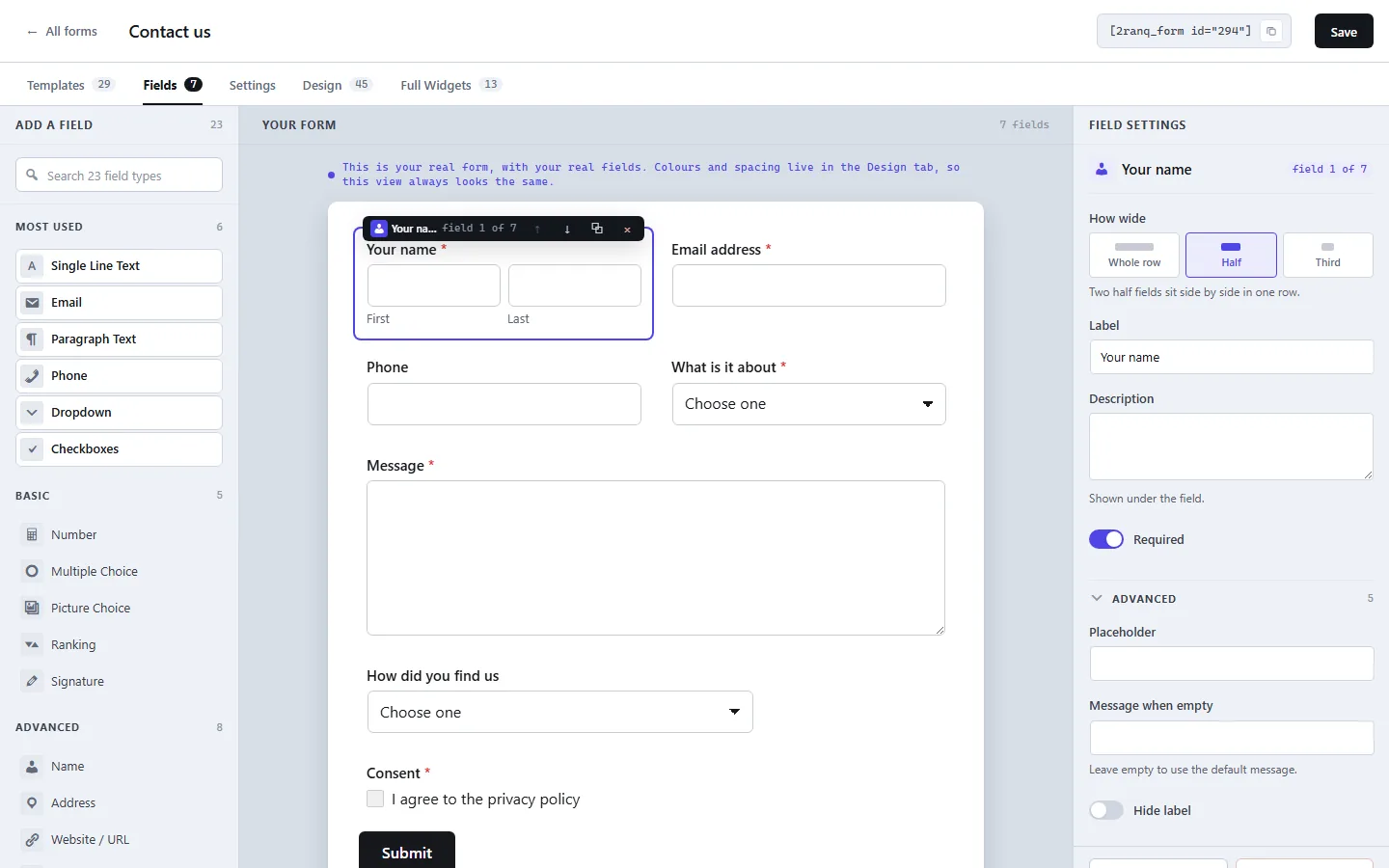
The builder. The middle is not a sketch, it is the real form with your real colours and spacing, so what you approve is what the visitor gets.
// Video
Watch it build a form in a few minutes
Conditional logic, file uploads and multi step forms, shown in the plugin itself. Watch it on YouTube
// What it does
A whole form builder, not the free half of one
The parts that are usually kept behind a paid tier are the parts a real form needs first: logic, steps, uploads and a place to read the answers. They are all here, on the first day, in the free plugin.
Drag and drop, with a true preview
Fields are dragged into place and the middle of the screen shows the actual form, not an approximation of it.
23 field types
Including name, address, phone with country checks, date, time, rating, ranking, picture choice, signature, password and file upload.
Conditional logic
Show or hide any field based on an earlier answer, with several rules at once. The browser applies it and the server checks it again.
Multi step forms
A page break splits a long form into steps, with a progress bar and checks at the end of each one. Seven of the ready made forms already use them.
File uploads that are actually closed
Type, size and content are all checked. Files land in a folder that does not run code and does not list itself, renamed, with the original name kept beside the entry.
Entries in your own database
Every answer is stored in a table on your site and read on your own screen, with a reply by email in one click.
45 ready made styles
Pick one and then change any colour, corner, space or button on the Design tab. Thirteen of them are copies of real sites we run.
Ready made sections around the form
Thirteen full width contact sections with heading, details and photo, each one a rebuild of a live site. They wrap the form without touching it.
Block, widget or shortcode
A Gutenberg block, an Elementor widget and a plain shortcode, so the form drops into whatever you already build pages with.
23
field types, from a single line of text to a signature
29
ready made forms in nine groups, seven of them in steps
45
ready made styles, every one of them still editable
13
full width sections, each a copy of a real site
// Screens
Five tabs, and each one does a single job
Templates to start from, Fields to build, Settings for that one form, Design for how it looks, and Full Widgets for the section around it. Nothing hides in a submenu somewhere else in the dashboard.
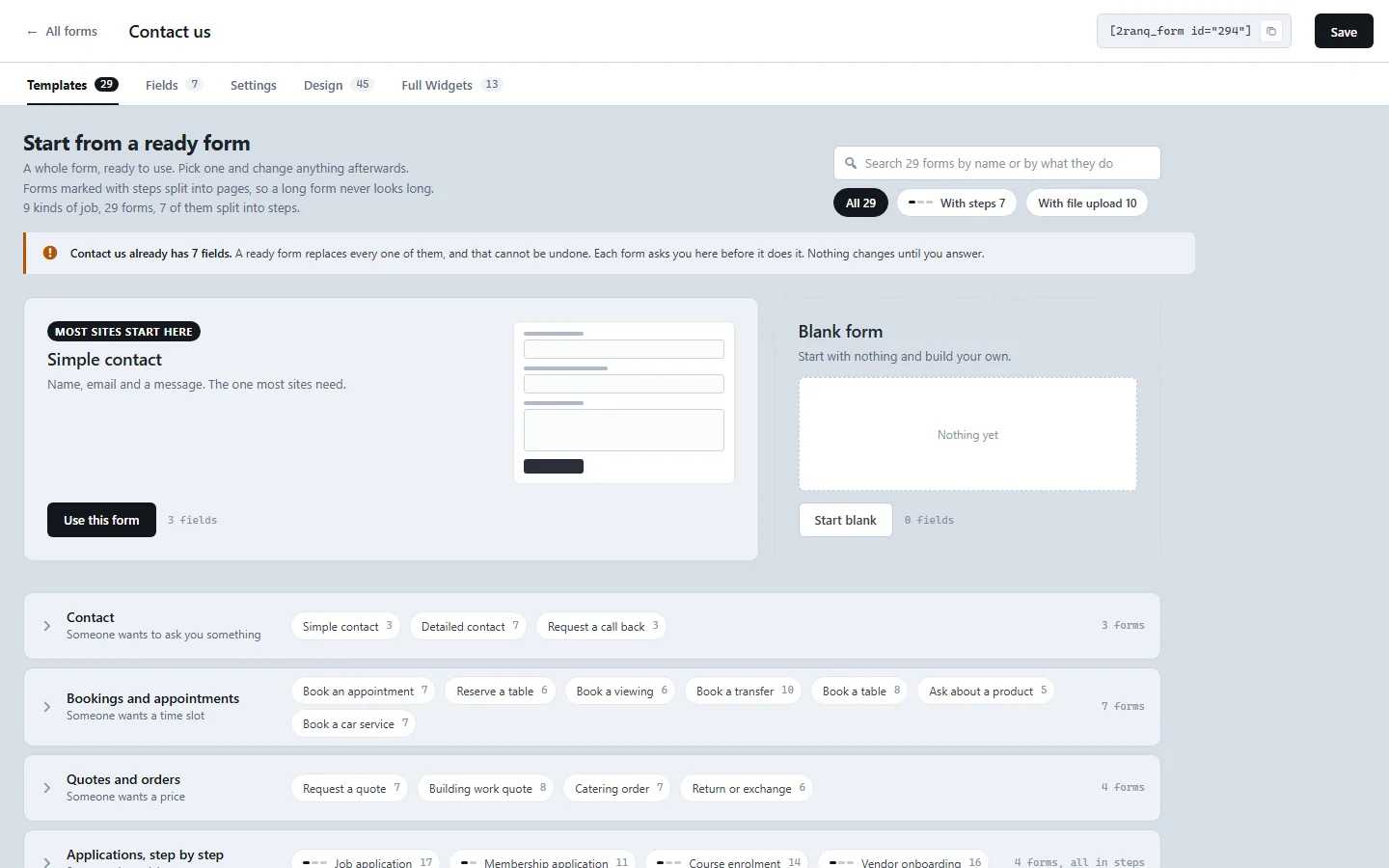
Templates. Twenty nine whole forms grouped by the job they do, not by industry, with a drawing of the fields on every tile.
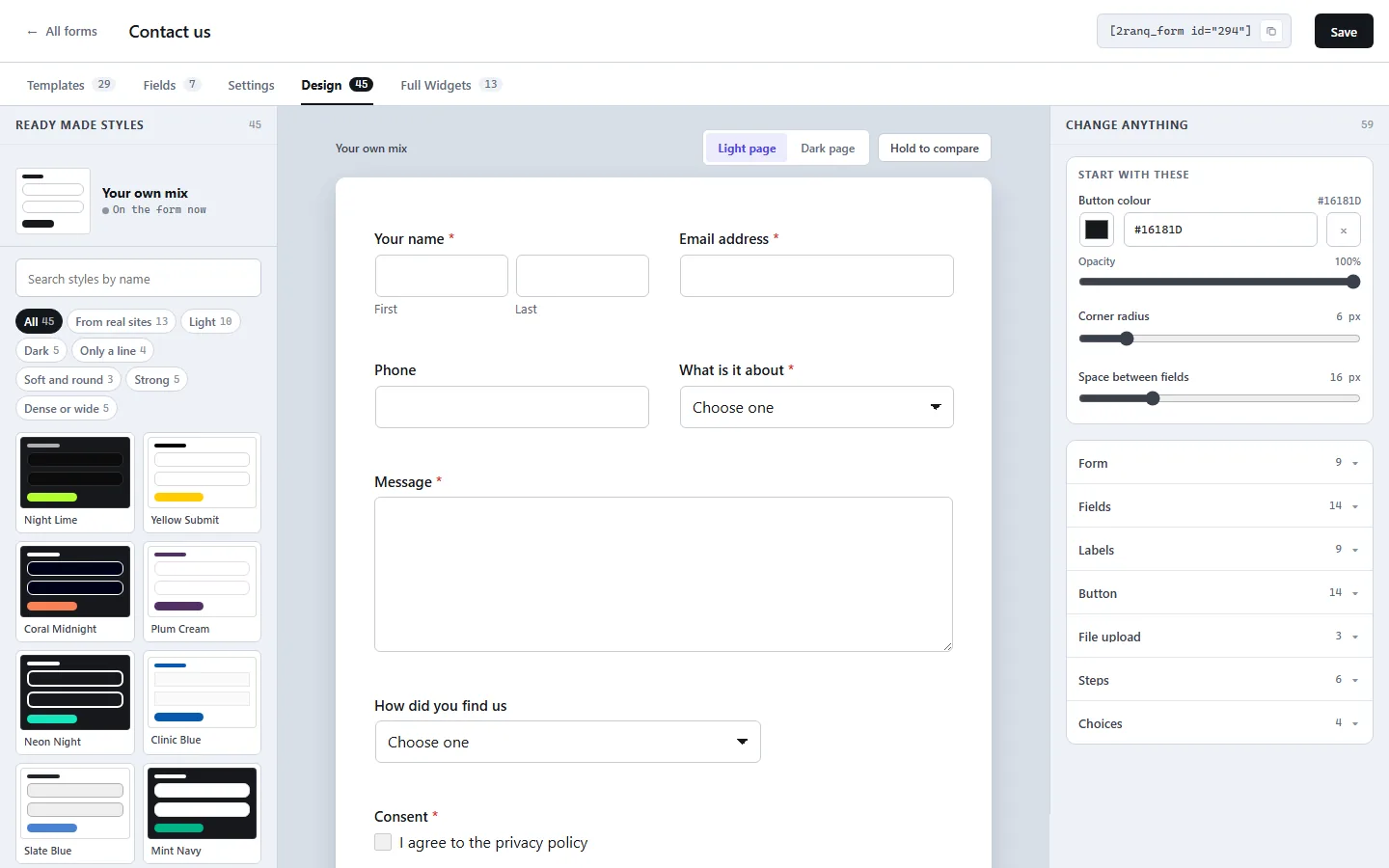
Design. Pick a style on the left, change anything on the right, and hold the button to compare it against a light or dark page.
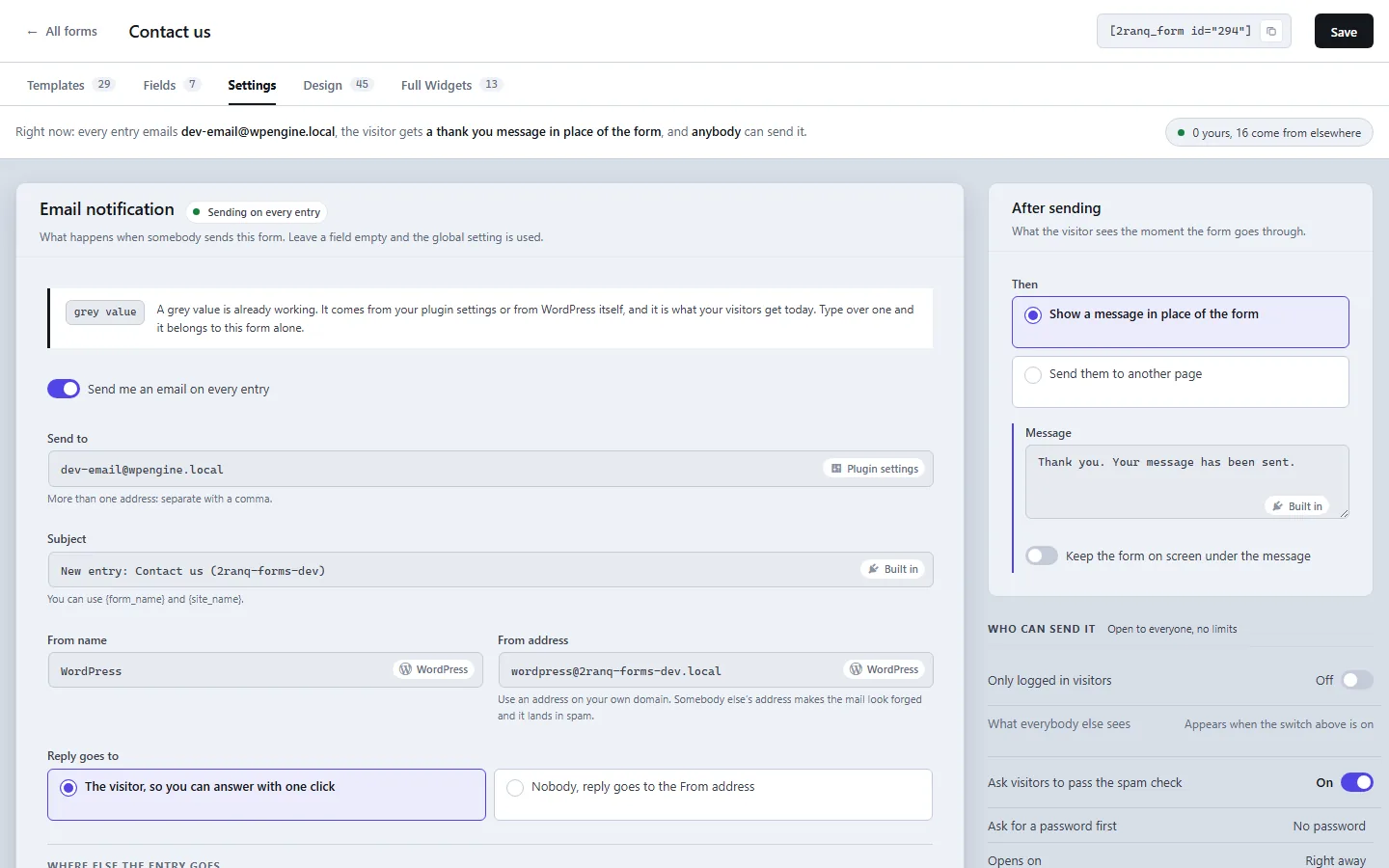
Settings, for that one form. Who gets the email, what the visitor sees afterwards, and who is allowed to send it at all.
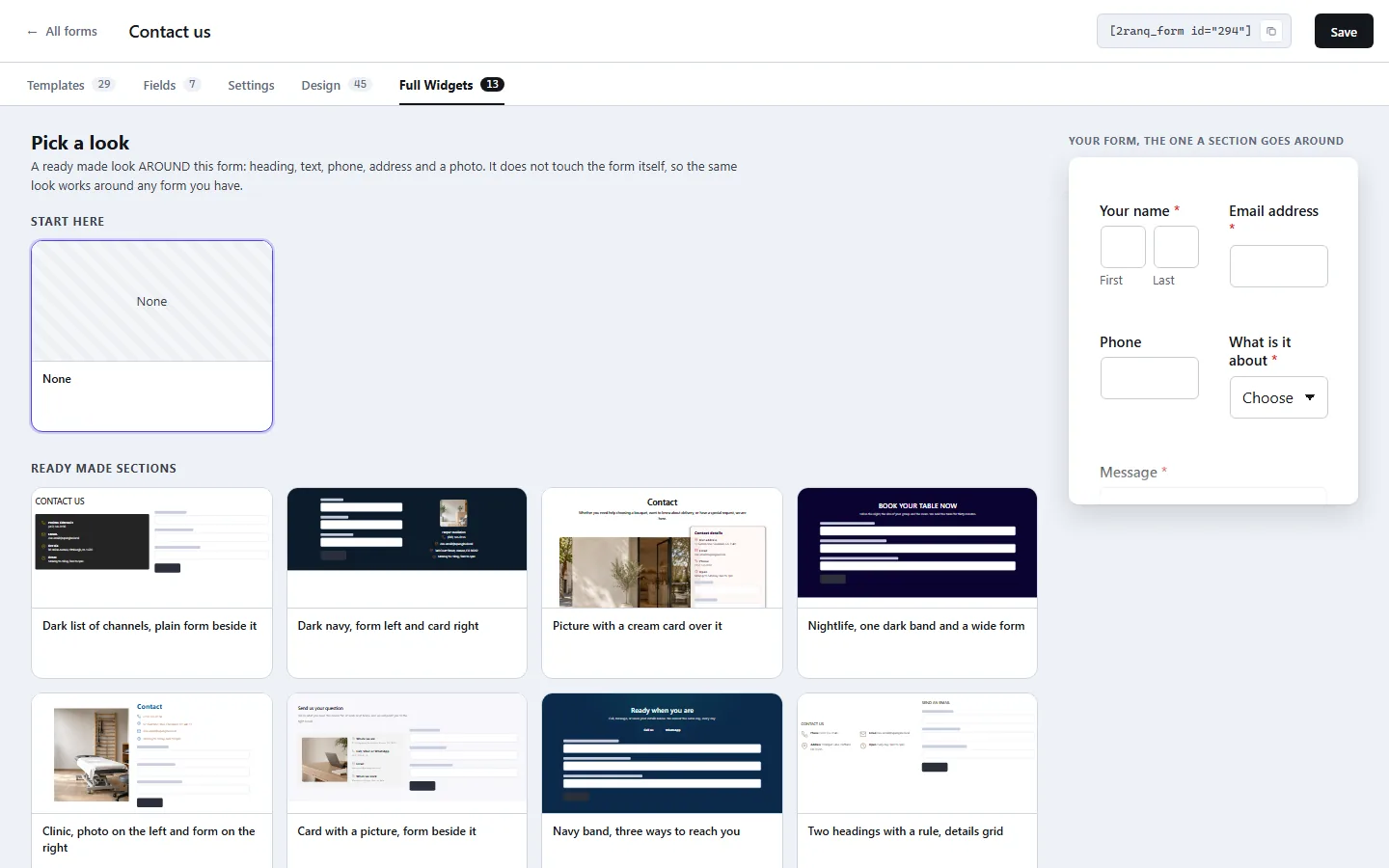
Full Widgets. A finished section around the form, with heading, contact details and photo. It never touches the form itself.
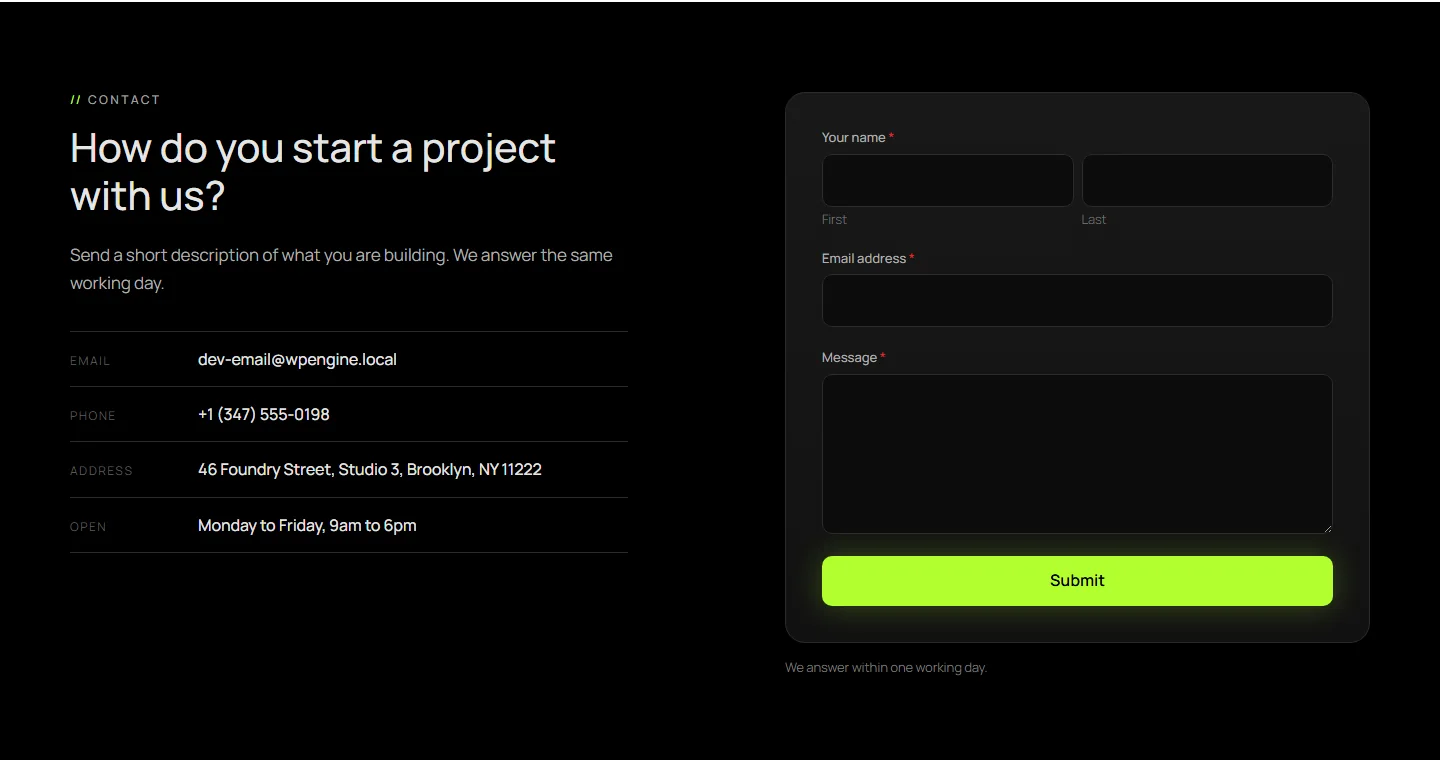
The same section on the page a visitor sees. This one is a rebuild of the contact section of this very site.
// Straight answers
How much does it add to a page?
Pages without a form load nothing at all from the plugin, because nothing is queued until a form is actually on the page. A page that does carry a form loads about eight kilobytes of stylesheet and six kilobytes of script, gzipped. The script is plain JavaScript, so jQuery is not pulled onto your site because of us, and no payment library ships inside the plugin.
What happens when JavaScript is blocked?
The form still works. Every step is shown at once, every field is visible, and the form submits the ordinary way. The server applies the same rules either way, so a hidden field cannot be smuggled in and a required one cannot be skipped. Conditional logic is a convenience in the browser and a rule on the server.
Where do the entries and the uploaded files live?
Entries go into a table in your own WordPress database. Files go into your own uploads folder, in a directory that refuses to run code and does not list its contents, each one renamed to something random while the original name is kept next to the entry. Storing the visitor address can be switched off. Removing the plugin leaves your forms and entries where they are. There is a setting that deletes them on uninstall, and it is off unless you switch it on.
// External services
What leaves your site, and only when you say so
Out of the box the plugin talks to nobody. Nothing is sent to us at any point, there is no account, no licence check and no usage report. The plugin can connect to five outside services, every one of them switched off until you turn it on and enter your own keys.
If you switch one on, the personal data in that form reaches that company, so tell your visitors in your own privacy notice. Here is exactly what goes where.
Google reCAPTCHA
Used for: stopping automated spam, if you choose it as your spam check.
What is sent, and when: the reCAPTCHA script is loaded in the visitor browser on every page that shows a protected form, which lets Google see the visitor address and browser. On submit, the token from that widget and your secret key are sent from your server to Google to be verified. Form answers are never sent.
Provided by Google: terms of service, privacy policy.
hCaptcha
Used for: the same job as reCAPTCHA, for people who would rather not send their visitors to Google.
What is sent, and when: the hCaptcha script is loaded in the visitor browser on every page with a protected form, which lets hCaptcha see the visitor address and browser. On submit, the token and your secret key go from your server to hCaptcha to be verified. Form answers are never sent.
Provided by Intuition Machines: terms of service, privacy policy.
Mailchimp
Used for: adding the person who filled in the form to one of your audiences.
What is sent, and when: after an entry is saved, and only for a form where you have chosen Mailchimp, your server sends the email address from the entry, the name if the form has a name or text field, and any tags you set, to the audience you name, signed with your own key. The person is added as subscribed, so ask for their consent on the form itself.
Provided by Intuit Mailchimp: terms of use, privacy policy.
Slack
Used for: posting every new entry into a channel, so the team sees it without opening the dashboard.
What is sent, and when: after an entry is saved, the form name and the answers are sent to the incoming webhook address you paste in. Nothing is sent until that address exists.
Provided by Slack: terms of service, privacy policy.
A webhook of your own
Used for: sending the entry to any address you give, which is how people reach Zapier, Make, n8n or their own system.
What is sent, and when: after an entry is saved, the entry goes as JSON to the address you typed: the entry and form ids, the form name, your site address, the time and every submitted field. An optional secret of yours travels in a header so the other side can tell it is really you. There is no fixed company behind this one: the address is yours, so the terms and the privacy policy are those of whatever service you point it at.
// The details
What it needs, and who wrote it
| Current version | 1.0.1, the first public release |
|---|---|
| Requires WordPress | 6.6 or newer |
| Requires PHP | 7.4 or newer |
| Licence | GNU General Public License, version 2 or later. The full text ships inside the plugin folder |
| Price | Free. There is no paid version, no trial and no add on to buy |
| Where it is published | In the WordPress plugin directory, as wordpress.org/plugins/2ranq-forms |
| Written by | Quantum, Serbia, and published by 2ranq |
| Support | Write to [email protected], or open a thread in the support forum on WordPress.org |
// FAQ
Common questions about 2ranq Forms
Most people want to know the same four things: what the catch is, whether it slows the site down, where the data goes, and what happens if they stop using it.
Is anything locked behind a paid version?+
No, and there is no paid version to unlock. Conditional logic, multi step forms, file uploads, the design tab and the entries screen are all in the plugin you install. We build websites for a living, and the plugin is not where we make the money.
Does it send anything to your servers?+
Never. There is no account, no licence check and no usage report. The only requests that leave your site are to the outside services you switch on yourself with your own keys, and each of those is listed above with what it sends and when.
Will it work with my theme and page builder?+
A form goes in as a Gutenberg block, as an Elementor widget or as a shortcode, so any theme can take one. The form carries its own look from the Design tab rather than inheriting whatever the theme does to inputs, which is why the same form looks the same on a dark and a light page.
What happens if I remove the plugin?+
Deleting it leaves your forms and entries in place. Settings has a switch that removes them on uninstall, off by default, so nothing disappears unless you asked for it. Your entries are yours while it is installed, so export them first if you want to keep them.
Found a bug, or need a field that is not there?
Write to us. We read every message about the plugin ourselves, and a good bug report usually turns into a release rather than a ticket.
Get in touchOr write straight to [email protected]