
WPForms alternative usually means one thing: you hit the point where conditional logic, multi step forms or file uploads stop being free. This is what the paid line actually costs, what the free tiers really include, and how to decide without paying to find out.
What a WPForms alternative has to replace
WPForms Lite is a good free contact form plugin. The trouble starts when a form needs to do something. Here is how WPForms describe their own free version, on their listing in the WordPress plugin directory:
This plugin is the Lite version of WPForms Pro, which comes with email subscription forms, multi-page contact forms, file uploads, conditional logic, and extra payment integrations.
So the three things most people go looking for are the three things behind the upgrade. A replacement is only useful if it covers all three, and covers them properly, not as a limited preview.
Which free features do you actually need?
Most sites need fewer features than the comparison tables suggest. Before you compare anything, write down what your form has to do. In practice it comes down to four questions.
- Does a field need to appear only sometimes? That is conditional logic. A company number field that only shows to companies, for example.
- Is the form longer than about eight fields? Then it wants steps, otherwise people abandon it on one long screen.
- Do people send you documents? A CV, a photo of a damaged part, a signed form. That is file upload.
- Do you need the answers stored on your own site? Email alone loses things. Entries in your database do not.
If you answered no to all four, WPForms Lite is fine and you can stop reading. If you answered yes to any of them, keep going.
The free tiers, compared honestly
These are the vendors' own words from their WordPress.org listings, not our summary of them. It is worth checking yourself, because the marketing pages and the plugin listings sometimes read differently.
- WPForms Lite. Conditional logic, multi step and file uploads are all Pro, quoted above.
- Ninja Forms. Sells Conditional Logic, File Uploads and Multi Step Forms as separate paid add-ons.
- Fluent Forms. The fair exception. Conditional logic is genuinely in the free version. Multi step and file upload are Pro.
- Contact Form 7. Free and stable, but there is no visual builder and conditional logic needs a third party add-on.
- Gravity Forms. No free version at all, so it is not in this comparison.
Fluent Forms deserves the credit there. If conditional logic is the only thing you are missing, it is a reasonable answer and you do not need to read further.
What we built, and why
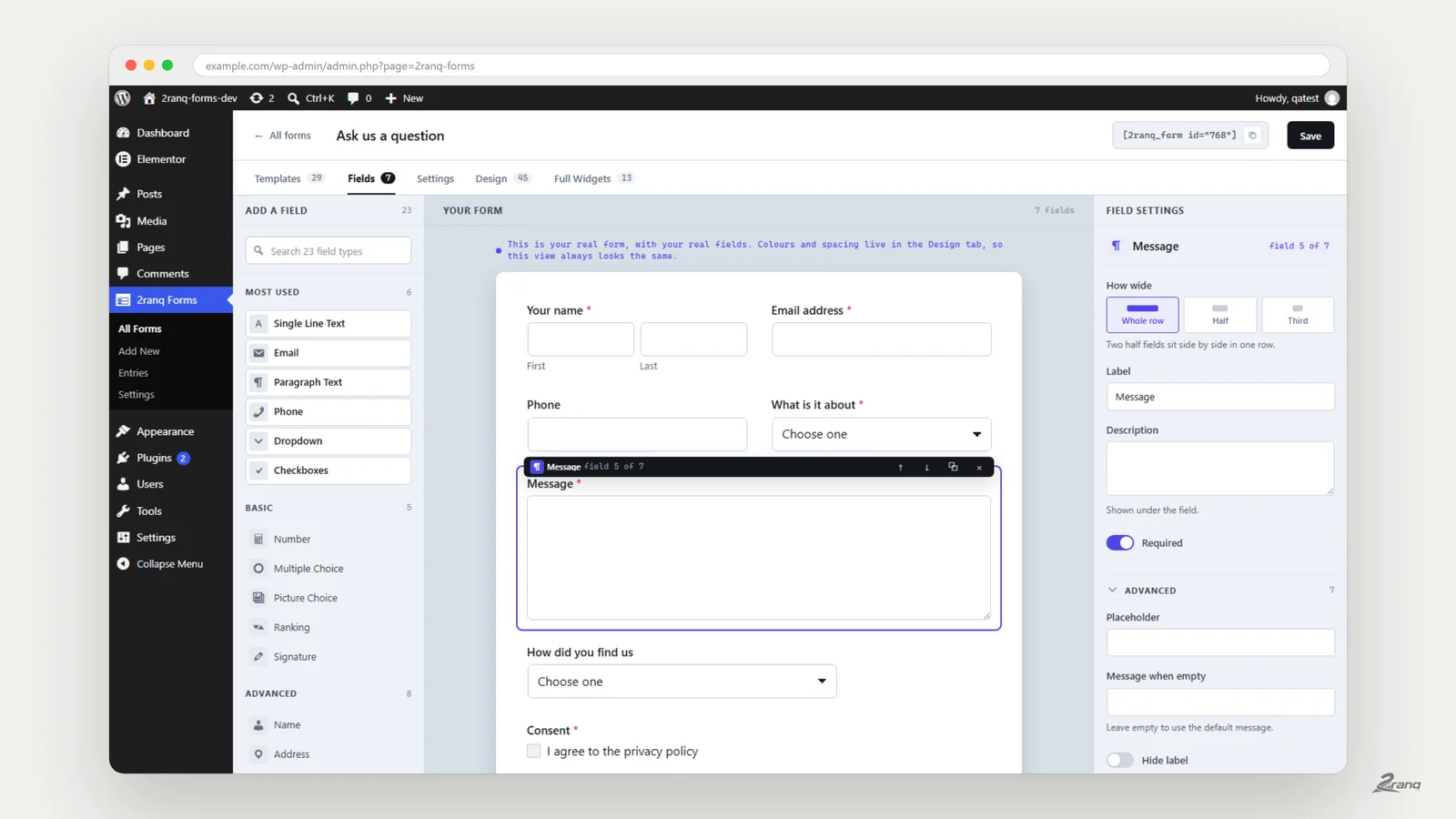
We build WordPress sites for clients. The same conversation kept repeating, so we wrote the plugin we kept wishing existed and published it free under the GPL. It is called 2ranq Forms, and there is no pro tier to upgrade to.
Everything below is in the version you download. Not a trial, not a limited count, not a feature that stops after a month.
- Drag and drop builder with a live preview of the real form, not a sketch of it.
- 23 field types, including name, address, phone with per country digit checks, date, rating, signature and file upload.
- Conditional logic, evaluated in the browser and checked again on the server.
- Multi step forms with a progress bar and validation on every step.
- Entries in a table in your own database, with CSV export.
- 29 ready made forms, 45 design styles, a Gutenberg block and an Elementor widget.
Size on disk, measured rather than claimed
Plugin weight is easy to assert and easy to check, so here is the check. Both plugins were installed on the same machine and measured the same way, by adding up the real size of the files.
- 2ranq Forms: 80 files, 1.75 MB on disk.
- WPForms Lite 1.10.0.5: 4,536 files, 29.3 MB on disk.
- Of that, 9.7 MB across 2,925 files are bundled vendor libraries. The Square payments SDK alone is 2,138 files, and it ships whether or not you ever take a payment.
- On a page with a form, gzipped: about 14 KB from us, about 31 KB from WPForms, plus jQuery, which their front end script depends on and ours does not.
One claim we will not make, because we went looking for it in the code and it is not true: WPForms does not load its assets on every page of your site. By default it loads only where a form is.
Is a free form plugin safe to trust with entries?
It depends on where the data goes, not on the price. A plugin that stores entries in your own database and sends nothing outward is safer than a paid one that syncs to a service you did not read the terms for. Ask three questions: where are entries stored, what leaves the server, and can you export everything if you leave.
For 2ranq Forms the answers are: your own database table, nothing unless you switch on an integration with your own keys, and CSV export from the entries screen. There is no account, no licence check and no usage report.
What it does not do
A comparison that only lists wins is not a comparison. These are the gaps, and some of them will matter to you.
- No payment fields. If you sell through a form, WPForms Pro or Gravity Forms will suit you better.
- CSV export only, no XLSX. A real XLSX writer would be larger than the whole plugin.
- No Cloudflare Turnstile yet. It was written and it worked, but the directory's automated scanner cannot tell Turnstile apart from a content delivery network and flags it. It returns in the next release. reCAPTCHA, hCaptcha and a honeypot are included.
- It is new. There is no long track record here, and that is a fair reason to be careful with a critical form.
How to switch without losing entries
Switching form plugins is where people lose data, usually by deactivating the old plugin first. Do it in the other order and nothing is at risk.
- Export your existing entries to CSV from the current plugin, before touching anything else.
- Install the new plugin alongside the old one. Two form plugins can coexist while you test.
- Rebuild one form, put it on a hidden page, and submit it yourself. Check the email arrives and the entry is stored.
- Swap the shortcode or block on the live page, then watch for a week before you deactivate anything.
- Only then remove the old plugin, and keep the CSV.
If the form is your main source of enquiries, do the swap on a quiet day rather than a Monday morning. Nothing here is difficult, but a broken contact form is expensive in a way that is hard to notice.
So which one should you pick?
If you need payments in a form, buy the paid plugin, it is the right tool. If conditional logic is your only gap, Fluent Forms free will do. If you need conditional logic and steps and uploads together, and you would rather not pay per site for them, that is exactly the hole we built ours to fill.
Install it from your dashboard under Plugins, Add new, and search for 2ranq Forms. If something breaks, tell us. Bug reports are worth more to us right now than stars.
Need a form your plugin will not let you build?
We build WordPress sites for a living and we publish the plugins we needed along the way. Tell us what is missing and we will look at building it.